Effortlessly Record Screen, Webcam, and Audio with DiReec Screen Recorder
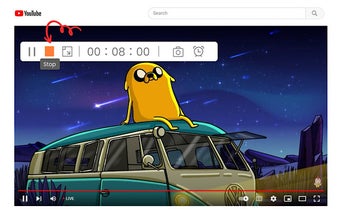
The DiReec Screen Recorder is a convenient and feature-packed Chrome extension that allows you to effortlessly capture screen activities, webcam footage, and audio. With just one click, you can record your screen and create engaging videos for later review or sharing.
One of the standout features of DiReec is its flexibility in capturing specific screen areas. It offers both predetermined recording areas and the option to manually select a custom area based on your requirements. Additionally, you have the freedom to save your recordings in various formats such as MP4, MOV, FLV, AVI, and MP3.
DiReec offers a range of impressive features to enhance your recording experience. You can record your screen, webcam, and audio simultaneously or separately, allowing for more versatility in your videos. The extension also supports high-resolution recordings, up to 4K, ensuring your videos are crisp and clear.
During the recording process, you can add annotations to your videos, capturing important details or highlighting specific areas. DiReec also allows you to capture screenshots before or during recording, making it easy to grab still images while recording your screen.
Scheduling recordings is made simple with DiReec, allowing you to set up automatic recordings at your convenience. The extension also includes hardware acceleration for lag-free recording, ensuring smooth and uninterrupted capture.
Other useful features of DiReec include the ability to show the mouse cursor during recording and the option to customize hotkeys according to your preferences.
Choose DiReec Screen Recorder for an effortless and fast screen recording experience that meets all your needs. Capture your screen, webcam, and audio with ease and create engaging videos for various purposes.